Wednesday, February 24, 2016

An Atheist responds to a Christian

Recently a Christian declared their faith by posting this image on Facebook:
They probably didn't expect much in the way of atheist comments but an atheist did respond with a similar format picture:
One thing I would like to ask Christians (or any other religion) "If there is a god/gods why would they want us to worship them?"


Sunday, December 20, 2015

A Home-made Cold Remedy

We all hate getting a cold and no-matter what the advertisements tell you, no tablet or liquid will cure them. Eventually your body will destroy the virus and with it a few of your cells, making you a little bit older.

There is no cure for the common cold (yet) but you can get some relief from the symptoms. Here's a remedy which works well at doing that.

A home remedy

In a tall glass:
  • add 2 fingers depth whiskey (use cheap stuff - not the 12 year old malt)
  • add 2 fingers depth honey
  • add 2 fingers depth lemon juice
  • Fill the glass with hot water, stir well and drink.
  • Snuggle up in bed with a good book and relax.
If you find your symptoms are not better after an hour or so repeat.

Now I know what some of you are going to say. "I don't like whiskey," but believe me - this tastes nothing like it. It tastes good, relieves a sore throat, relieves congestion and after three of them you won't care about the cold!

As to the good book - download 'Immortality Gene'. It's FREE and you can read about staying young and never getting another cold.

iBook 
Amazon
Nook
Smashwords

Monday, April 20, 2015

I Have Seen The Truth And It Doesn't Make Sense!

The EU changed the VAT regulations which apply to digital products on 1st January 2015. To those of us in the UK it meant a 17% VAT increase.

Previously we paid 3% on many Amazon digital products because Amazon shipped them to us via Luxembourg which applied their VAT rate of 3% - the lowest in the EU. From 1st Jan 2015 we were charged the VAT rate of the destination EU state rather than the supplier EU state. The UK therefore have to pay 20% VAT on digital products. (Ireland - 23%)

Does that seem bad? Instead of paying 3% to Luxembourg, we in the UK will be paying 20% to the UK. That means we pay more but at least it will be to our own country and perhaps it will mean we pay less in some other tax. Perhaps that makes some sense for music and video but there's one area where it makes no sense at all.

On January 1st 2015 the VAT rate on e-books changed too. The change affected all member states. The table at the right shows how the new rates affected e-book buyers in the rest of Europe. As you can see of the 28 countries in the EU five give e-books a special VAT rate. Ireland and the UK zero rate paper books.

In the UK the new rates mean a price rise of at least 17%. That doesn't seem a lot on an e-book which cost 77p formerly. They now cost 99p (a 29% price rise) but it's far more than inflation and a sharp contrast with the zero VAT rate on paper books.

Ask politicians and they'll tell you "Here in the UK, VAT is charged on e-books because they are a service."

Let's compare e-books with paper books and see how they compare:

Which of these is a service?
Paper books E-books
Requires an author Requires an author
Requires an editor Requires an editor
Requires formatting Requires formatting
Trees need to be felled (requires oil) Not required
Timber needs to be transported to papermill (requires oil) Not required
Papermill manufactures paper with some waste sludge (requires some oil) Not required
Sludge needs to be disposed of (requires oil) Not required
Paper needs transporting to printer (requires oil) Not required
Ink needs manufacturing (requires oil) Not required
Books need to be printed (requires oil) Not required
Books need to be transported to distribution depot (requires oil) Not required
Sales team need to visit retail outlets (requires oil) Not required
Books need to be transported to retail outlets (requires oil) Not required
Customer needs transport to bookstore and back (requires oil) E-books are delivered direct to reader electronically.
Surplus unsold books need transport back to printer (requires oil) Not required
Surplus requires storage or redistribution or pulping (requires oil) Not required
Book pulp requires cleaning of toxic ink and disposal of the toxins (requires oil) Not required

As you can see far more 'services' are required in the production of paper books than in the production of e-books. 

So:

  • The EU and the UK have a declared aim of reducing carbon emissions, yet favour paper books which produce them at the expense of ebooks. It's been estimated that 95% of the carbon dioxide emissions could be eliminated by switching to e-books.
  • The sludge produced by recycling books contains some particularly nasty toxins which are expensive to dispose of safely.
As for the reasons we are given for the 20% VAT charge in the UK -

I have seen the truth and it doesn't make sense!

Is there hope that VAT will be reduced for e-books? EC president Jean-Claude Juncker told the German newspaper association that the commission will next year consider the introduction of a reduced VAT rate for online books and digital newspapers. So - they consider this in 2016 and implement any change in 2017? Do you think that's soon enough?

So what can be done?


Tuesday, September 30, 2014

Know about iBeacon technology? Possibly open to abuse?

iBeacon technology is something you may not be familiar with now but you will be seeing it very soon. It may help you but it may also be open to abuse.

What is an iBeacon?

iBeacons are small devices which transmit a signal to smartphones nearby. Imagine you're in a department store. You plan on getting a new pair of shoes and you're going to browse for a book also. You examine some shoes but don't find what you want. As you walk away your phone beeps and a text message tells you:
 'There are more shoes round the next corner  on the left. We have some special offers there.'
Wonderful - you find exactly what you want and it's on offer. You buy them and walk towards the books and magazines section. As you leave the checkout you get another message:
'Do you need a sports bag to keep your shoes in? They are on the next floor up. You can get a 10% discount today.'
You ignore that message.

How it works

The shoes you first looked at carried a small tag like the security tags fitted to some products. The tag detected your phone and triggered the first message as you walked away without going to the payment desk. Had you tried to steal shoes it would have reacted as a normal security tag. There was a second iBeacon near the shoe department entrance. It recognised your phone as belonging to someone who had just made a purchase of shoes and triggered the second message.

iBeacons can be placed anywhere. They are low cost devices, programmable and potentially useful to a shopper.
  • As you walk past a coffee shop you could be offered a free coffee 'today only - just show this message'. You get one but the friend you are with has to pay for theirs. It's detected both your phones.
  • As you walk past a cinema you are told what is now playing.
  • As you pass a newsagent you are told there's an update available on a story you've been following.
  • When you are near a clothes shop you are told there's a sale of jackets now on.
  • iBeacons can be set to only act if it's target has been near it for some time, you won't be bothered with messages about vacuum cleaners if you are just passing by them but may be messaged if you've been in that area for a while.
 Obviously it's highly targeted advertising which may get irritating after a while. It may draw your attention to things you might otherwise have missed though.
The actual iBeacons are small. They run for years from a button cell. They are self adhesive and cost little - about $10 at the moment but that price will drop. To pick up their signals a shopper would have to have a free app installed on their phone. They will try it out and if they find it benefits them, it will stay on their phone.

How it can be abused

There's nothing to stop someone hiding their own iBeacon in a store which uses the system. The iBeacon could quickly be hidden under a shelf.
  • As you browse the books you might get a message telling you it would be much more convenient and cost less to get the book in e-book format at Amazon. Just click this link to download it now to your phone. The link is of course an affiliate link which earns the iBeacon owner a small commission.
  • While you wait for a bus outside the store you may get an advert for a game to pass the time.
  • A hidden iBeacon may direct shoppers to a competitor's store.
If you want to know more about the technology try this video from Estimote Beacons.


Finally, perhaps I have a devious mind but as soon as I found out about iBeacons, I saw the potential they have. Maybe I could use an iBeacon in a location where people are browsing for books or waiting to direct people to the free ebook I have? I'm sure you can think up some other possible ways to use/misuse the technology. Let us all know in the comments.
If this post has helped or entertained, will you help us? Download a FREE copy of our book 'Immortality Gene' from http://smarturl.it/avi
Even if you never read it (but we hope you will) - it will help our rankings.
Look - a FREE e-book

Saturday, December 28, 2013

For those in the UK - How to view the sites the BBC won't let you see

Did you know the BBC has a number of websites which they don't make available to those of us in the UK?


Launched in February 2012 BBC Future was heralded as the new international technology, science, environment and health site from the British Broadcasting Corporation. If you try to access it in the UK (Link http://bbc.com/future ) you'll get this message:

It's not the only BBC site like this, you can't visit http://www.bbc.com/travel or http://www.bbcentertainment.com/ either.

Since the BBC is mostly funded by licence fees paid in the UK many people in the UK feel there's something not right about a BBC site which can't be viewed in the UK. As  the Chief Executive of the TaxPayers’ Alliance said, "Those in Britain unable to access these services available to the rest of the world have every right to feel cheated."

The BBC are caught between a rock and a hard place though. It's a commercial website which earns money for the BBC through advertising; something the BBC is not allowed to do in the UK.
"Under the BBC’s Fair Trading rules commercial websites are not allowed to receive unfair promotion from the BBC’s public services.  This prevents us from being able to provide Future content on BBC.co.uk," they say.

So how do we in the UK view these BBC websites? 

I'm going to show you two methods. I'll use BBC Future as an example.

Method 1 - using the Internet Wayback Archive

There's a very useful site on Internet which keeps a a record of web pages. It's called the Internet Archive Wayback Machine and is available at http://archive.org/web/ . The Wayback Machine archives all BBC pages and you can view their latest 'BBC Future' pages at http://web.archive.org/web/*/www.bbc.com/future This page lists all the days an archive has been made and you can usually click the latest one and interact with it just as someone outside the UK would. It's an easy method where you won't be bothered by adverts - they are not archived, but does have disadvantages. You seldom get today's pages; if you are lucky you will see yesterday's pages. Not all pages are archived and it's poor at viewing the multimedia.

Method 2 - using a proxy server plugin

I use the ZenMate Chrome plugin. It's free and available from https://zenmate.io/home Instructions on the site will tell you how to install and use it. To view the BBC Future site Click the plugin icon and set your location to New York. Then turn ZenMate on and go to the BBC Future website (http://bbc.com/future) It's as simple as that. Everything, including multimedia and adverts will work. Just remember to turn ZenMate off when you are finished. Zenmate can cause some problems with some websites which detect proxy servers, so to get round that I also use another plugin for Chrome - One Click Extensions Manager . Using that you can instantly disable and enable ZenMate as required. A word of warning though - be careful to decline the other items offered with it.

Enjoy those 'hidden' BBC websites but before you leave - let me tell you about two offers (OK - two shameless plugs):
1. Until July 2014 Shelia Chapman's book 'Blood of the Rainbow' is just £1.87. (US$2.99) This is an awesome paranormal suspense e-book with five star ratings.


2. Download a free copy of the book I co-author 'Immortality Gene'. It's a technothriller, romance, medical thriller, science fiction... a bit of everything. Even if you don't read it, it will help our ratings. Available at Amazon, iTunes, B&N and others FREE!

Monday, December 02, 2013

'Sideloading' apps not available from Amazon on a Kindle Fire HDX

If you get a Kindle Fire HDX then by now you'll probably have found its limitation - you are tied to those apps which Amazon has decided you need. DON'T PANIC! There is a way round this - sideloading.

The Problem

The Nook reader on a Kindle Fire HD!
Amazon's Appstore for Android contained 50,000 apps back in early September 2012 but that was nowhere near the 700,000 offered by Google Play and Apple App Store then. The obvious solution would be for Kindle Fire owners to download Android apps from Google Play - except you can't. The Kindle Fire HDX simply won't allow you to connect to the Google Play store and download the app you want - you have to get it from Amazon. That's very understandable. Amazon tell us they are not making a lot of profit from sales of their Kindle Fire. Instead they expect to make their profit from sales of books, video, music and apps. To do that they make it easy to obtain these from the Amazon site and difficult, but not impossible, to get apps from elsewhere.

The Solution

Android is an open source operating system and the Kindle Fire HDX has version 4.2 of it. So most of the apps in the Google Play store should work just fine. In fact most of them do work, you just have to get them on your Kindle. Here's how to do that using a technique known as sideloading.

You are going to need some equipment, most of which you probably already have:


  • An Android device (we'll call this 'device 2') such as a mobile phone or tablet which you can connect to the Google Store
  • A USB to micro USB lead which fits your computer and Kindle Fire/device 2
  • A computer 
  • Your Kindle Fire
  • An app - ES File Explorer installed on the Kindle Fire HD/HDX and device 2. (yes this is available from the Amazon Appstore and on Google Play. It's free!)
Now you need to know what to do. As an example I'm going to show you how I installed the Nook ebook reading app on my Kindle Fire HD and my Kindle Fire HDX. Naturally this competitor app is not an app available on the Amazon Appstore for Android but it's very useful to have if you earlier purchased a Nook ereader and want to read your Nook books or epub books on your Kindle Fire.

How to sideload an Android app to a Kindle Fire HD / HDX

The Kindle Fire HDX is even better. Ours took just one day
to arrive from Amazon at http://smarturl.it/KindleHDX

This method also works for the Kindle Fire HD with some minor modifications. I used it to install the Firefox android browser (Sorry Amazon but your browser Silk is rubbish), the Nook e-reader software and some games not available in Amazon's store. Here's the method for the Kindle Fire HDX. I've used the Nook app as an example:
  1. Install ES file explorer on your Kindle HDX. It's available free in the Amazon store.
  2. Install ES file explorer on your other Android device. It's a free app available at Google Play
  3. Install the Nook reader software on your other Android device from the Google Store. Again it's a free app from Google Store.
  4. On the Kindle HDX use go to  Settings > Applications and set 'Applications from unknown sources' to 'On'. Accept the warning.
  5. On the other Android device use ES File Explorer. Choose Tools >'app manager' from settings. Long press on 'Nook' and choose backup.
  6. Connect the other Android device to your computer using the USB cable. You should see it appears in an explorer window as an extra drive under 'Computer'. 
  7. Navigate to the Nook.apk file you just backed up. In my case, since I was using a Nexus 7 as my 'other Android device' it appeared as Computer\Nexus 7\Internal storage\backups\apps\NOOK_3.3.0.26.apk Copy this file to your PC. On a Samsung Galaxy S4 the files appeared in Computer\Galaxy S4\Phone\backups\apps
  8. Connect the Kindle fire to your PC and transfer the Nook.apk file to it. The root folder will do.
  9. Load ES File Explorer on the Kindle Fire and find the file you just placed there. Once you select it you'll get the option to install it. Do that and try it out.
  10. On the Kindle use Settings > Applications and set 'Applications from unknown sources' to 'Off' again. 

It's a little involved but really quite simple.

Of course the same technique can be used to install almost any Android application which isn't available on the Amazon Appstore. There are a few which don't work, Sky Go for one. It installs and you can see what programs are available but it won't let you play them.

You can also download apps to your PC from other sources and install them BUT - a word of caution. Although the apps available from Amazon and Google are generally safe, the same can't be said for all app sources. It's unwise to download and install apps you are not certain of. You might install a rogue app which could cause a lot of problems.


If my blog has helped you - can you do me a favour?

Download a free copy of the book I co-author 'Immortality Gene'. It's a technothriller, romance, medical thriller, science fiction... a bit of everything. Even if you don't read it, it will help our ratings. Available at Amazon, iTunes, B&N and others FREE!

Tuesday, October 08, 2013

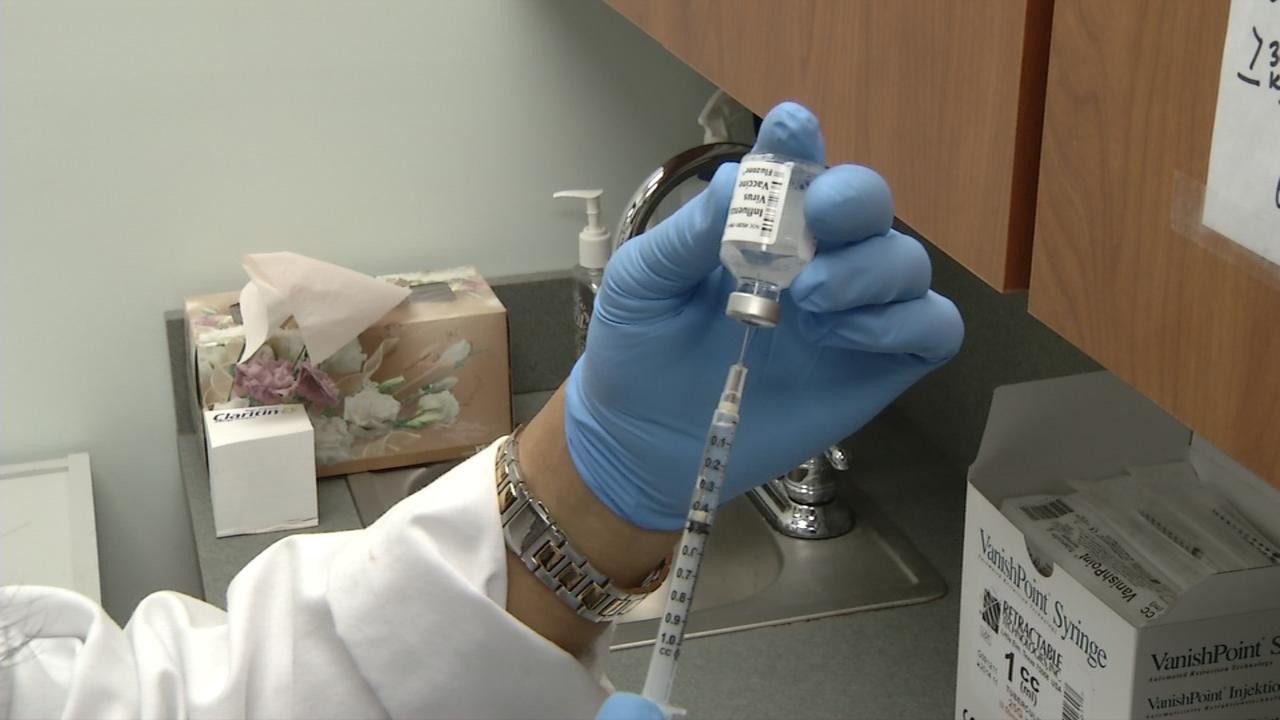
Thinking of getting a flu shot?

What do you know about flu shots? I did a few minutes research on Internet and found the following out:

Flu shot image - Fox News
  1. There were 128,000,000 flu shots given last year in the US alone.
  2. Current prices for the shot can be calculated fairly easily as follows. (These are NOT bulk purchase prices which may well be lower):
    • 10 flu doses - $15.38
    • 10 disposable needles & syringes - $4.59
    • 200 alcohol prep pads - $3.49
    I make that $2.01 per shot or less.
  3. If you buy the shot in the US most places seem to charge $20.00. That's a healthy $17.99 profit.
  4. The drug companies stand to make $250 million in sales from the flu shots in the US assuming the same number of people get one this year.
  5. Assuming just one in ten flu shots is bought, Doctors and pharmacies will make $230 million from flu shots alone. They do give away the other 9 free right?
  6. The CDC is keen on everyone getting a flu shot.
  7.  Flu vaccine can be obtained in large bottles with multiple doses to bring costs down. These large bottles contain a preservative which contains mercury. The other single dose vaccines do not contain mercury.
  8. Mercury is an accumulative poison.
  9. The CDC says 5 to 30 percent of the US population will get the flu each year.
  10. Other sources say 3% get the flu each year
  11. Some sources say just 2 out of every 100 people will not get the flu because of a vaccine. Since 3% would normally get the flu the manufactures claim a 66% prevention rate.
  12. 590 out of every million pregnant women who have a flu shot will abort. However getting flu can cause an abortion too but no-one quotes figures on that that I can find.
  13. The number of people who have unpleasant side effects from the flu shot exceeds the number who get the flu.
  14. Flu can kill you
  15. People have died from the flu shot.
  16. They put MSG in the nasal spray version of the vaccine which can cross the blood/brain barrier and cause brain problems
  17. The spray vaccine contains a live virus which could give you the flu but is very unlikely to do so. 
  18. Statins don't mix well with flu shots.
  19. A recent report found the flu vaccine was ineffective for those under 2 and for the elderly.
  20. Those who get the flu shot and who still get flu have a much greater risk of being hospitalized from it.
Now I'm not a doctor or medically qualified. It seems to me some doctors in the US have an interest in promoting flu shots though. There are doctors on both sides of the get vaccinated/don't get vaccinated argument.

One doctor, very much against the annual flu shot is Dr Mercola. He cites evidence that there are more effective prevention methods than flu shots. His suggestions also help prevent or lessen the effects of other flu like diseases such as the common cold.
  • Vitamin D can be 4 to 10 times more effective. The best results coming from people who got vitamin D by exposure to sunlight. Failing that krill oil, fatty fish such as tuna, mackerel, and salmon are good sources. Take as a prevention.
  • Garlic. Take as a prevention.
  • Zinc supplements - Up to 50mg per day but only when you have symptoms of cold or flu.
  • Vitamin C. Take as a prevention but step up the amount if you have symptoms
  • A tea made from a combination of elderflower, yarrow, boneset, linden, peppermint and ginger; drink it hot and often for combating a cold or flu. It causes you to sweat, which is helpful for eradicating a virus from your system.
Can someone who knows more about this than I do explain why we should or shouldn't get a flu shot?


Tuesday, September 24, 2013

Something Advertisers Should Be Ashamed Of


Advertisers are using dubious methods to put your computer at risk!

Here's the problem
I recently updated my copy of the Calibre program - a wonderful bit of software against which I have no complaints, just praise. This is what I saw. I've set the screen capture to display what most people would see if they use a common screen size - 1366 x 768 pixels:
Now here's what they would see if they had a taller screen:
As you can see that large green download button isn't where you download Calibre - it's an advertisement and something the advertiser should be deeply ashamed of because it's designed to trick people into downloading something they would not normally choose to download.

In this case it tells you you are downloading 'Premium 7-Zip' but it doesn't tell you anything about the program. A search on the Web indicates it might be useful or might also contain a computer worm.

One such program I've seen people being tricked into downloading is 'BrowserSafeguard.' This is a browser extension which intercepts your searches at Google and sends back a list of five or so of it's search results before the real Google results. Nothing really wrong with that except, when I checked it, every single site they linked to was flagged by Web of Trust as being of dubious quality. It changes your proxy server settings to do this.
Can you imagine Google will be happy with that? Look closer at the images above.
See that little icon at the top right of the advert?

This means that this advertisement is being produced through Google's advertising service. Shame on you Google for allowing these trickster advertisements!

So what can you do to avoid being caught out?

  1. Use the scroll bar and make sure that download button is not an advert.
  2. Hover your pointer over it and make sure what the status bar tells you it is sending you to is not something unexpected.
  3. Refresh the page and see if you get a different advert where that download button was:


Maybe the ultimate answer is to demand that Google and other advertising firms forbid these adverts designed to trick us. Here's how to do that:
1. When you see one of these fake buttons trying to trick you look for the small X at the top left

2. Selecting it allows you to 'Report this ad'

3. Tell Google the ad was inappropriate

If my blog has helped you - can you do me a favour? Download a free copy of the book I co-author 'Immortality Gene'. It's a technothriller, romance, medical thriller, science fiction... a bit of everything. Even if you don't read it, it will help our ratings. Available at AmazoniTunesB&N Google Play and others FREE!