Monday, November 26, 2012

Extending a wireless network (and curing Kindle dropped Internet connections)

After lots of experiments with different router settings I've come to the conclusion that Amazon Kindles just don't like connecting to BT Home Hub 3 routers. The problem I have is compounded by my house having three feet thick stone walls. If I'm lucky I'll get a three bar wireless signal. I finally decided that if I was to avoid tearing any more hair out, the way to cure the problem was to add an additional wireless router to my home network.

What you will need

Over the years I've moved homes several times and changed ISPs several times too. I've acquired a number of wireless routers so I didn't have to buy a second router. This is what you'll need:

  • A 2nd wireless router. I had a spare one already but if you need to buy one expect to pay about £35 for a new one or £20 second hand. Ebay and Amazon both sell them as do computer shops.
  • A length of CAT 5 Ethernet cable with an Ethernet plug on each end. Get the length you need plus a little extra. These can be bought ready made, in various colours, quite cheaply on Ebay.
  • Cable clips to fit your Ethernet cable.
  • A short Ethernet lead (one probably came with your routers)
  • A computer to change the settings with.

Position the second router

Decide where you need your extra router. It needs to be near a power socket and also somewhere easy to run a cable to. For the moment lay out the cable which will connect the routers without fastening it down or connecting it at either end.

Find out some information about your current router

Now you need to find out the IP addresses that your existing router uses. On your computer go to a command window and type in  IPCONFIG then press Enter. Make a note of your 'gateway'. Here's what I got typing this in on a laptop - the red arrow shows what you are looking for:

Next go to a web page and type the gateway address into the URL/address bar. In my case 192.168.1.254
You will need to know the router admin password. Usually this is written on the back of the router or is blank. On a BT Home Hub 3 its on the pull out tab at the top of the router. If you can't find it then read the manual which came with your router or go to the manufacturer's site and find the default password there. If you changed the password (as you should) and forgot it, then reset the router, usually by pushing a paperclip into the reset hole and holding it in for 10-15 seconds. Your router should be switched on while you do this.

Type in the password to get access to the router. Find out two things from it's settings:
  1. The channel number the router uses. It may be set to auto. My BT router used Channel 6.
  2. The DHCP network range of IP addresses the router uses.
    On my BT Home Hub 3 I found this by going to Settings > Advanced settings > Home network > IP Addresses. The addresses on mine were 192.168.1.64 - 192.168.1.253

Setting up the second router

Now we need to set up the second router. Connect it to it's power supply and connect the short Ethernet cable from it to your computer. Use one of the 4 sockets grouped together on the router NOT the one marked WAN.

You'll need to know the second router's IP address, administrator name and password. Again get this from the router manual or the manufacturer's website. Reset the router to it's factory default if you've forgotten a password you set.

I was using a D-Link router which used 192.168.0.1 as it's IP address, admin as the username and the default password was blank.

You need to make some changes to the second router's settings:

  1. Find where you can change the router's IP address. On my D-Link I found this under Setup > Network Settings. Look at the gateway address you found and the DHCP network range of IP addresses the 1st router uses. Choose the nearest number to the Gateway IP address
    My BT Home Hub 3 gateway address was 192.168.1.254
    The DHCP network range of IP addresses the router used was 192.168.1.64 - 192.168.1.253
    The nearest IP address was then 192.168.1.253
  2. On your computer open a command window and type in ping 192.168.1.253 (or whatever number was your nearest available one). IF that IP address is unused you'll see something like this:

    This is exactly what you want to see. Set the second router's IP address to this value

    If the IP address is already being used you'll get something like this:

    If this is the case you'll have to choose a different IP address - change the last part of the number only.
  3. In the same area of settings (2nd router) look for DHCP server settings and disable the DHCP server
  4. Save the second router settings. At this point your connection to the second router will end.
  5. Disconnect the second router from your computer and connect it to the first router using the long Ethernet lead. Again avoid the WAN ports on both routers.
  6. Back on your computer, in a web page type in the new IP address you gave the second router. Again enter the username and password to access it.
  7. Change the Wireless Network Name (or SSID) of the 2nd router. Choose a simple to enter name but not one which contains personal information or the router type. On my D-Link router I found this under Setup > Wireless settings > Wireless network Name. I resisted the temptation to call it 'GoogleCameraCar' or 'MI5van'
  8. Set the Wireless security mode to WPA-Personal or WPA/WPA2
  9. Set the wireless access key (on D-Link routers this is called a pre-Shared key) to something cryptic, at least 10 characters long, and using both letters, numbers and symbols. Don't use a word found in a dictionary or a name. Make a note of this key!
  10. Set the wireless channel to be different to the one used by the first router. If you have an older Kindle don't use channel 11. The further away the channel numbers are from each other the better. I used 6 on my main router and 10 on the 2nd router.
  11. Save your settings again.
  12. Now you need to set a new administrator password for the 2nd router. On my D-Link I found this under Tools > Admin. Again set this at least 10 characters long and make it a mixture of letters, numbers and symbols. NOT 'Password', blank, your car registration, your mother's maiden name, your pet's name, your date of birth or anything else easy to guess. Make a note of this password!
  13. Save your settings again!

You should now find you get a MUCH stronger wireless signal and should be able to connect your ebook reader to the new network. If you are using a BT Home Hub 3 - no more lost Internet connections on your Kindle devices.

Tidy up those cables

The final job is to tidy up the Ethernet cable and fix it in place so that you don't trip on it. It's a little more complex than fitting a telephone extension cable because it's thicker and you should try to avoid sharp bends in the cable. These will slow the signal down. I find it's OK to hide it under the edge of carpets, or tack it in place using cable clips.


If this post has proved useful to you would you do me a favour in return? Download a FREE copy of the book I co-author - a romantic technothriller called 'A Vested Interest'. Even if you don't read it it will help our ratings. You can get it at http://smarturl.it/avi and if you want to read it, you can use a phone, a tablet, a computer or even a Kindle.

Sunday, November 25, 2012

Mother. Go home and let me work!

Translation: Let those without sin cast the first stones
Mother, go home and let me work!

Sunday, November 04, 2012

Wrong time and date on a Kindle Fire HD?

Here's how to cure it:

  • Press and hold the power button for a full 20 seconds
  • Release the power button
  • Switch back on
When it restarts it will get the correct time from Amazon. You won't lose any of your downloaded books.

Thursday, May 10, 2012

Moans and confessions

It's a while since I had a good moan about the things people leave outside my house (See If I Were JayDax Almighty) but today there was something new.

I live on a main road and just outside my house is a small lay-by (US: 'lay-by' = 'roadside parking spot'). It seems to be a favourite spot to clear their cars of the rubbish they gather in them. Every few days I go out and clear the grass of the stuff people throw there.

It's 22 miles to the nearest MuckDonalds, but that seems to be just the right distance for people to eat their fries and drink their shake. presumably it either takes longer or shorter to eat their burger because I never find the empty wrappers for them.

Despite it being illegal to drink and drive in the UK, I always find a few empty beer cans.

Soda bottles and empty crisp (chips) packets I get by the sackful.

Each day there are five to ten empty cigarette packets. I always wonder why smokers seem to think that they are not litter.

Every week or so I collect a used diaper - If I'm lucky it's wrapped up.

I could have gathered a fair collection of CDs (some even play but definitely not the one chewed by a dog). I've found two mobile phones, both broken. One DVD player - also broken. A black and white portable TV - which still worked and even had charged batteries.

And today's new item? A packet of four Viagra which brings me to the confession bit.

Expect me to confess I need Viagra? Not me! I may be ancient but I've not had that problem (yet). My confession is that once I built a website for a person selling Viagra and other prescription drugs online. You know - the sort of site that spammers try to send you to today.

We built the site back in 1998 soon after Viagra became available. At the time I'd never heard of it. I was asked to research it and make a website to sell it. Now at that time spam wasn't a big problem so I didn't see anything wrong in making the website. Apparently many people in the US didn't want to go to their doctor to talk about this nasty little problem they had so on-line sites sprang up where you could fill in a questionnaire. A doctor (we had a real one in California) would look over your answers and write you a prescription. The pharmacy would then send you Viagra (again the real stuff) anonymously. The site lasted about a year before the state of California decided it was against the law to sell the stuff in California online and prosecuted it's owner.

Would I do it again today? No way! Anyone buying Viagra online has to be some sort of fool because:
  • there's no guarantee that you'll get the real stuff - apparently it's often faked
  • it's invariably promoted by spam and I hate spam!
  • giving your credit card details to a spammer is just asking for trouble.
  • you really would be better getting checked out by a doctor who can do blood tests and check blood pressure e.t.c.
OK moan and confession over. You can go back to whatever you were doing. Oh - one last thing. The doctor we used a picture of sure gets around. The same picture was used in 2010 as part of a National Front campaign in the UK.

Monday, April 09, 2012

Solving Facebook Game Problems

Solving problems which prevent Facebook games working properly (Applies to all Facebook games)

For game issues try:


  1. Refresh the browser page
  2. Clear the browser cache See http://www.wikihow.com/Clear-Your-Browser's-Cache
  3. Can you not see all of the game screen or see an uneven edge to it? Try resetting the screen view size. First click in a blank area of the window. Then most browsers will let you reset the screen size by holding down Ctrl and tapping 0 (zero key but not the one on a number pad). If this doesn't work in your browser try doing it in Google Chrome browser. You'll find this resets the screen size of Flash in all browsers.
  4. Is movement jerky and difficult to control (referred to as 'Lag')? Restart the browser completely. Make sure you close ALL browser windows before reloading the page.
  5. Clear the Flash cache at http://www.macromedia.com/support/documentation/en/flashplayer/help/settings_manager07.html
  6. Try a different browser. Chrome seems to work best; Internet Explorer seems to cause the most problems although Internet Explorer 9 has solved most of them.
  7. Check to see if it's a Facebook issue at http://developers.facebook.com/live_status
  8. Restart the computer
  9. Check to see if there is more than one version of Flash installed and delete any older versions. (Current version is 11.2.) If you are using a 64 bit browser then you may find things are helped by installing the 64 bit version of Flash available from Adobe.
  10. Check the page http://www.adobe.com/software/flash/about/ This page tells you if you need to update your Flash player. If you right click in the Flash area (the bit that moves) you will get a menu which gives you the option to 'Show all'. Make sure 'Show all' is checked.
  11. Are you using Firefox and any add-ons? Mozilla have a web page about add-ons which slow down a browser. You should disable any of them you have installed to improve speed. The list is at https://addons.mozilla.org/en-US/firefox/performance/#addon-11
  12. If your browser is still slow then turn off the music, the sound effects, animation and reduce the graphic quality using the game options (often a gear cog icon).
  13. If your game fails to load completely or you get a server error message - There are often multiple servers hosting facebook games. It's possible that one may need restarting.
    If you find this problem affects you, try this:
    a. Close down ALL BUT ONE browser window
    b. In the last window log off Facebook
    c. Shut down your computer
    d. Re-start your router/modem - if that gets you a new IP address (does for most)
    e. Restart everything, log on again and restart the game

    Hopefully that will get you on a different server but you have a chance of getting the same bad one so you may have to do it again :(

    The same method MAY work if you are badly affected by lag.
The above steps fix most problems but if this doesn't work then:
  1. Panic and raise the problem on the game's discussion board.


Thursday, February 02, 2012

Artists - I need advice on a painting

Some years ago I was wandering round a car boot sale in Essex and saw what I thought was a print of a lake. Closer examination showed it was a painting not a print. I bought it for just £8.00.
Now I'm no artist and I have no idea what medium this painting used. I don't think it's a watercolour but it has a dull surface, not shiny like a varnished oil painting.

Here's a close-up of the signature:
I can't make out the artist's name either. You might be able to see a little of the texture of the paint though. Those fine branches are raised out of the surface and easily felt.

The painting is done on canvas and is full of colour but as I said, the surface is dull. Does it need varnishing?

Wednesday, January 25, 2012

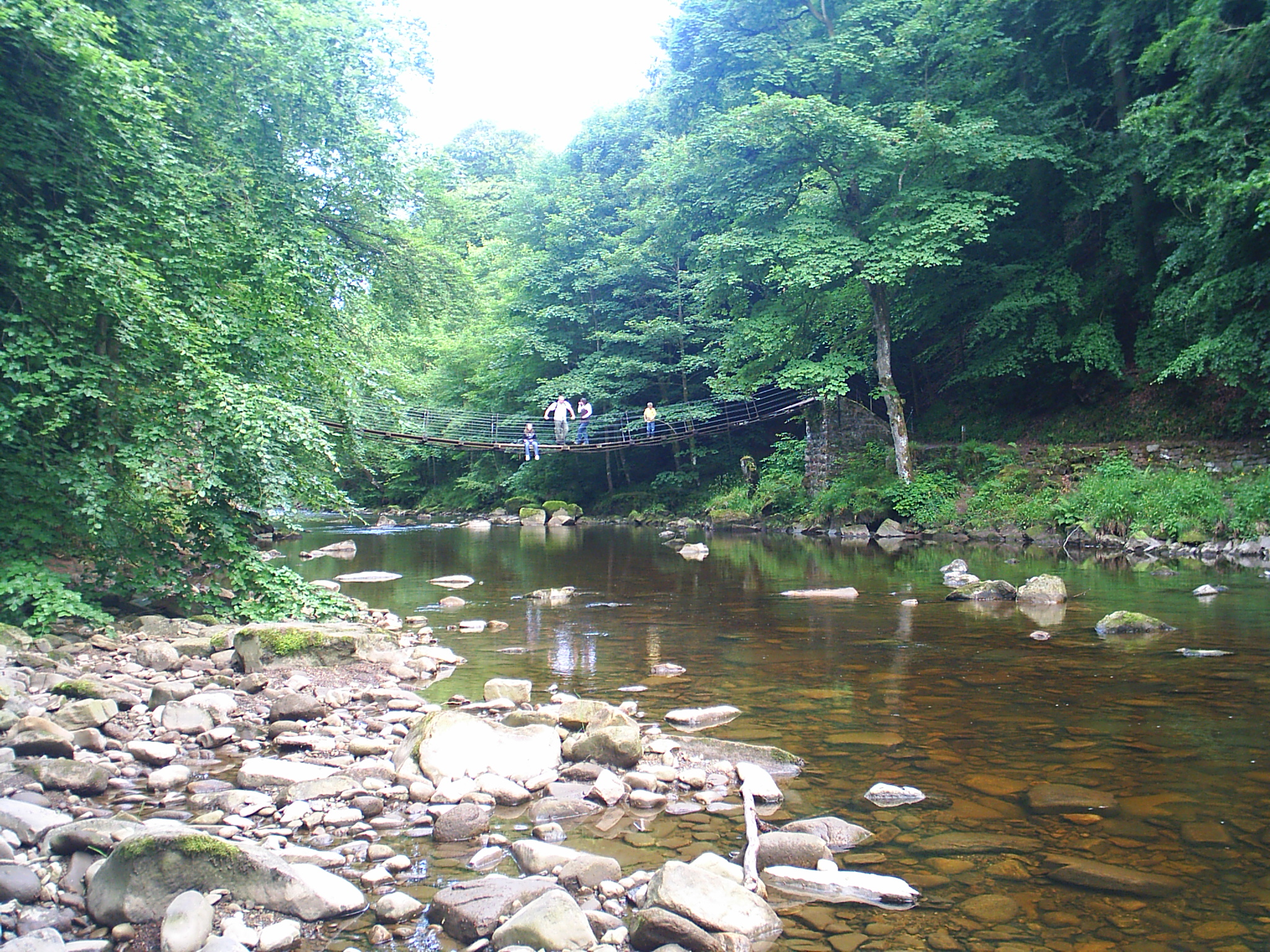
Allen Banks

I'm quite proud of this picture. it's of a bridge over the River Allen near where I live. The original picture is very large (2048 x 1536) and makes a great desktop wallpaper. If you want a copy of it you can download it free here. The reason I'm so proud of it is it was taken with a low resolution camera. It's actually four pictures stitched together. Bet you can't see the joins! There's more of the picture - a 360° panorama at this location.

The area, Allen Banks, is owned by the National Trust in the UK. It is a great place to go for a walk on a hot summer day. It's not too bad on a winter's day either. I'm just waiting for about four inches of snow and I'll be back there to take more pictures - but this time I'll take a better camera.

I have no idea who the people on the bridge are. I'm glad they were there though because the image wouldn't have been as interesting without them.